Techorph HTMS™

Operaciones

Mantenga el hotel en marcha, de la primera solicitud a la inspección final.

Dé a TI, housekeeping e ingeniería una forma compartida de registrar, asignar y terminar el trabajo, para que nada quede en una conversación de pasillo o en una hoja de cálculo.

2,50 US$por habitación/mes

La lista detallada de funciones se muestra en inglés.
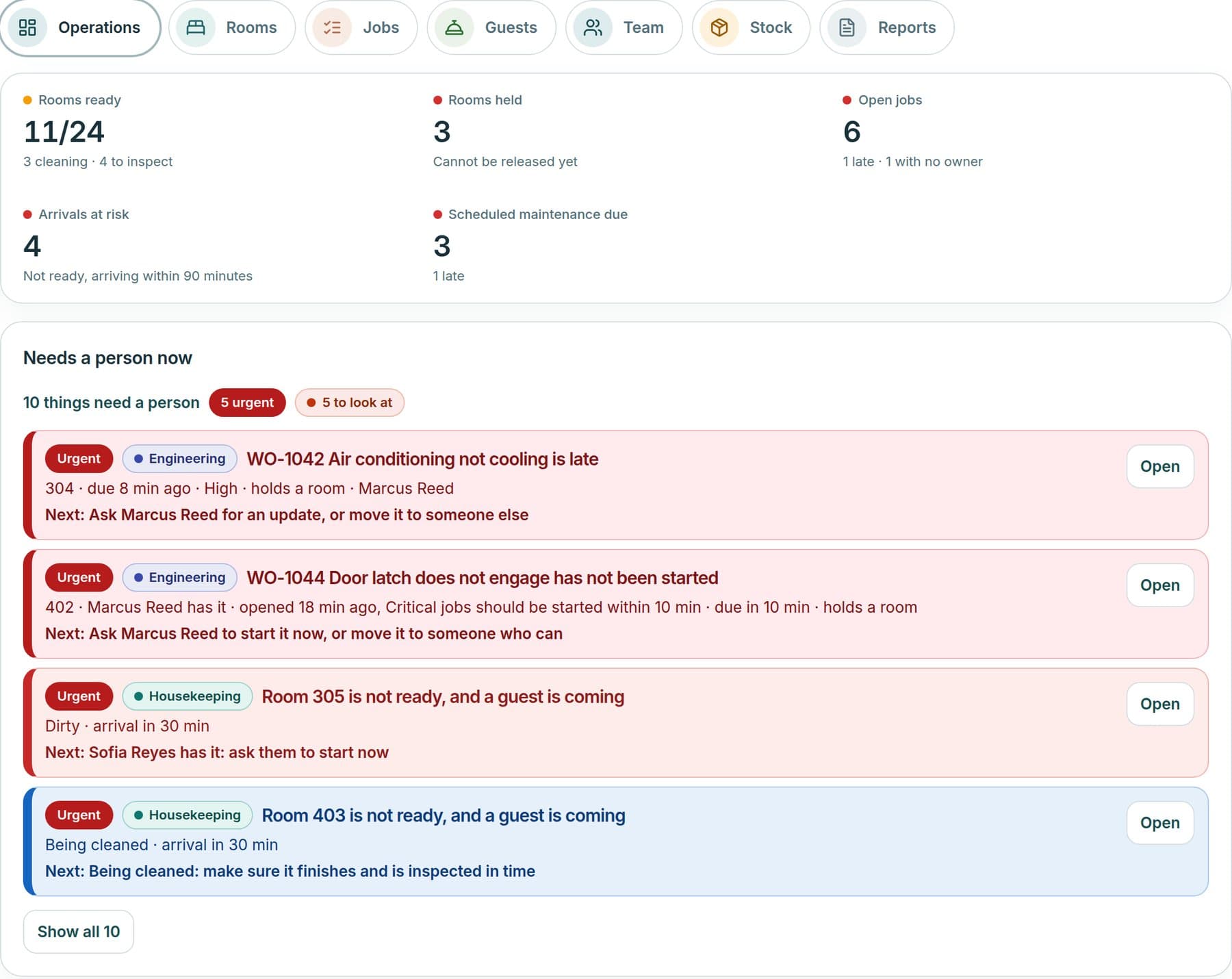
Roomline operations overview: rooms ready, rooms held, open jobs, arrivals at risk and the things that need a person now.
Pantalla de ejemplo · datos de muestra de Grand Harbour Hotel

Véalo en acción

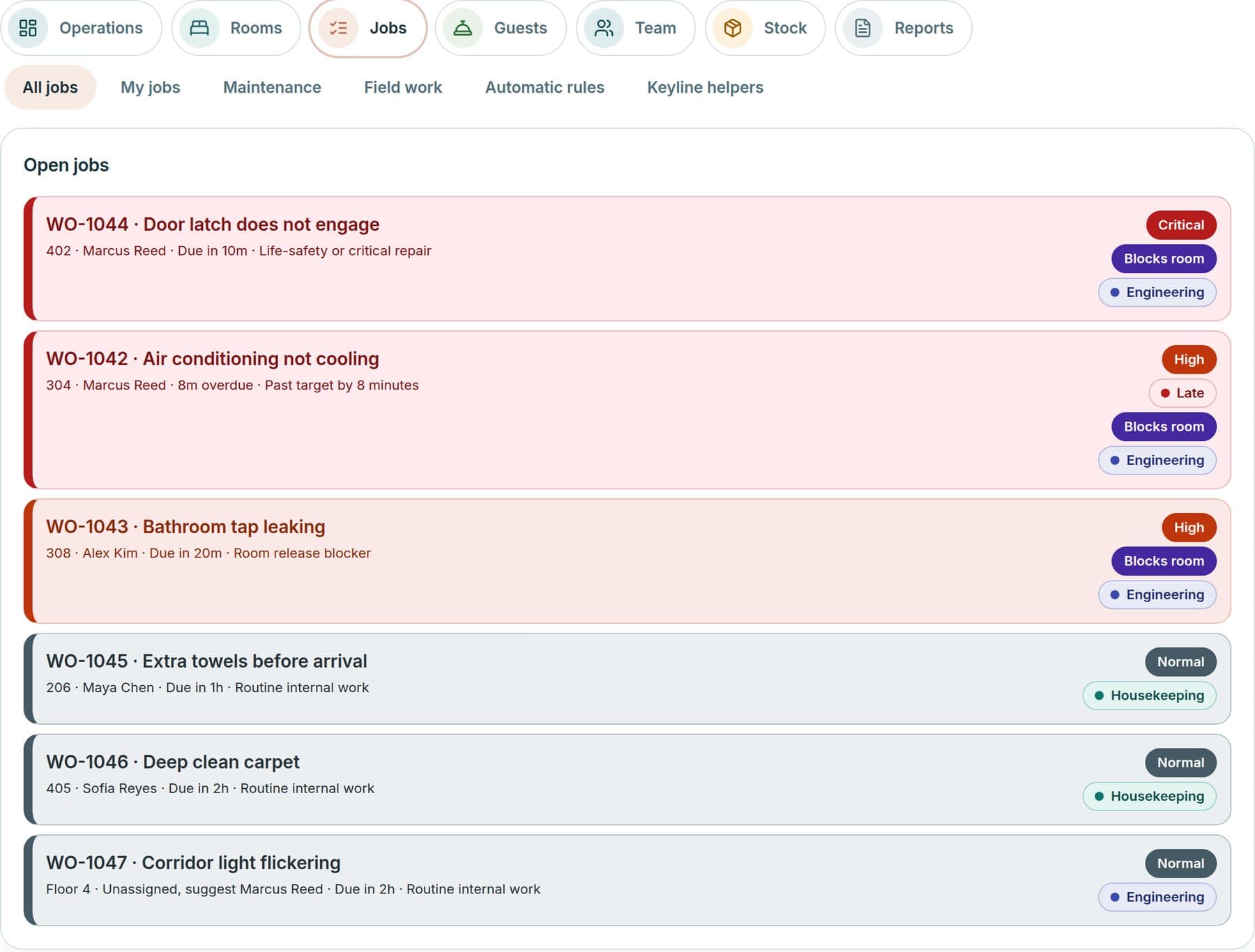
Roomline open jobs list with priority, owner, due time and whether a job blocks a room.
Pantalla de ejemplo · datos de muestra de Grand Harbour Hotel
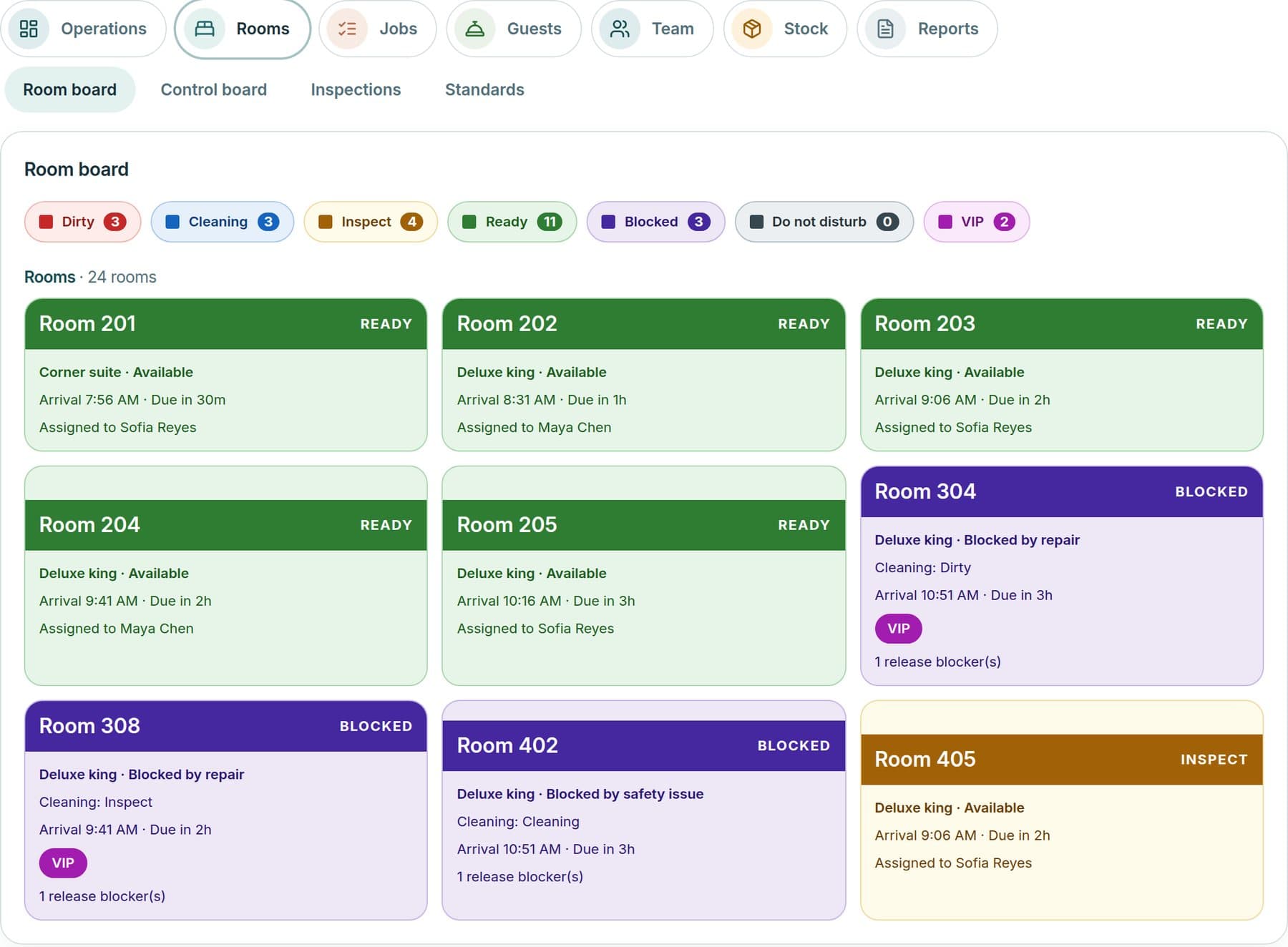
Roomline room board showing room status and readiness.
Pantalla de ejemplo · datos de muestra de Grand Harbour Hotel
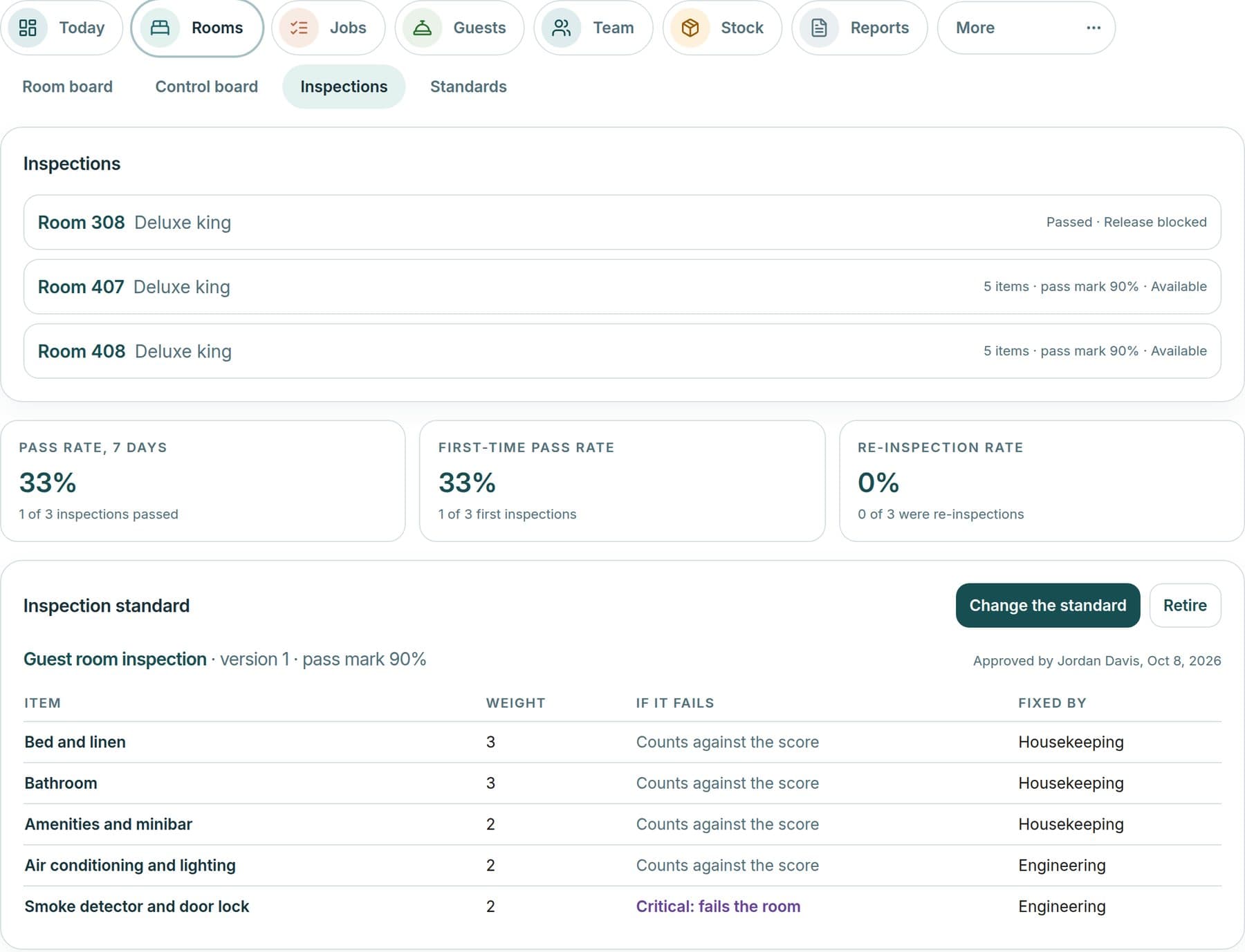
Roomline inspections view with checklists, findings and results.
Pantalla de ejemplo · datos de muestra de Grand Harbour Hotel
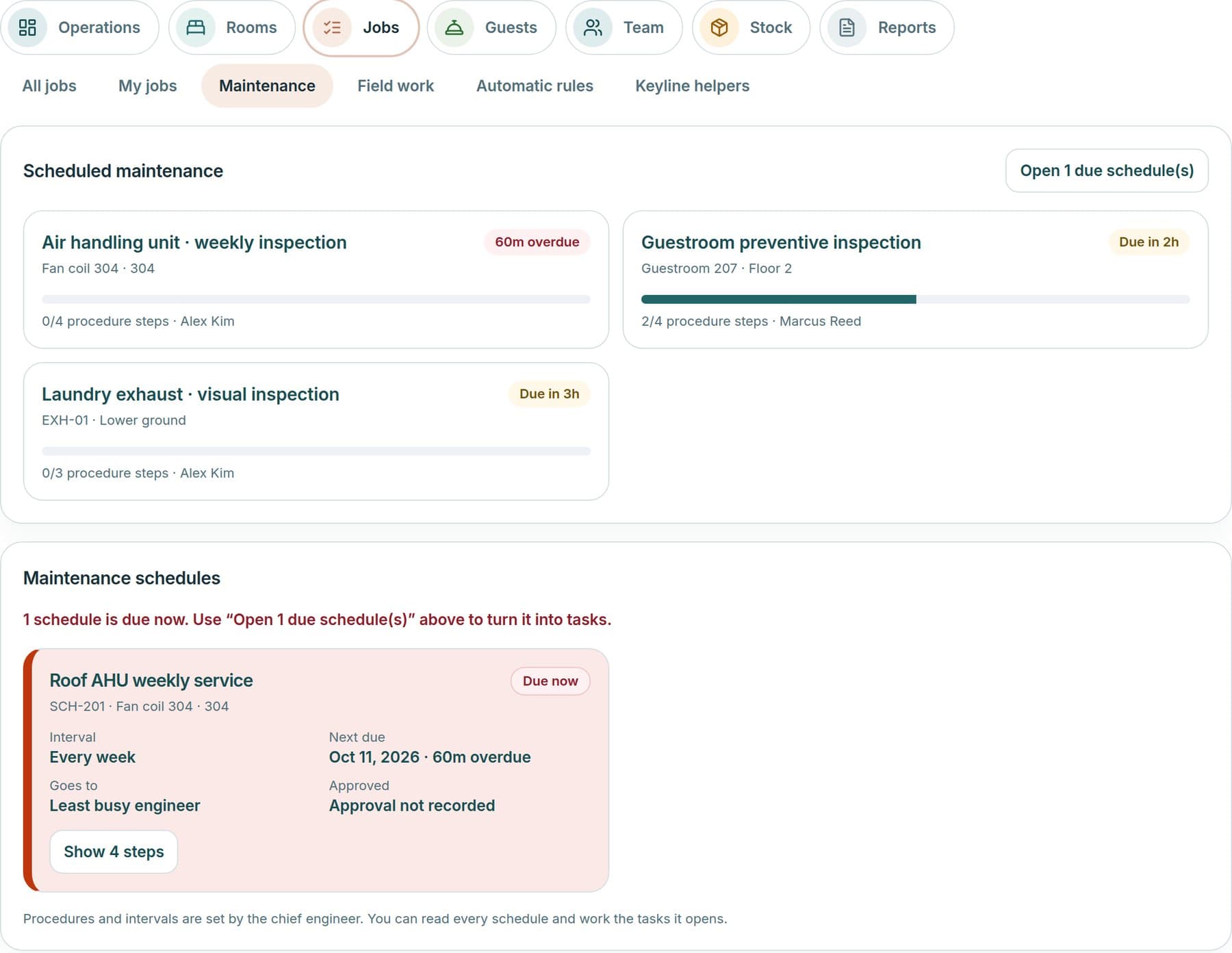
Roomline scheduled maintenance with overdue and upcoming services, procedure steps and the engineer responsible.
Pantalla de ejemplo · datos de muestra de Grand Harbour Hotel

Cómo una solicitud se convierte en trabajo verificado

Las solicitudes llegan a la mesa correcta, se asignan y se siguen, y solo se cierran cuando alguien ha revisado el resultado.

  1. Regístrela

    Los problemas tecnológicos abren un ticket en la mesa de servicio. Las solicitudes de habitaciones, housekeeping e ingeniería abren un trabajo en Roomline.

  2. Asigne y siga

    Cada elemento recibe responsable, prioridad y hora límite. Una lista de trabajo muestra tickets y trabajos juntos, y un enlace de traspaso lleva una solicitud de uno a otro.

  3. Haga el trabajo

    La asignación explica quién debe tomar un trabajo y por qué. Las listas guían la tarea y lo que se retrasa o se bloquea pasa a la lista de lo que necesita a una persona.

  4. Verifique y cierre

    Un supervisor verifica el resultado y una habitación solo se libera cuando supera la inspección.

Hoy son dos mesas que comparten una lista de trabajo. Un único formulario de solicitud que enrute automáticamente está planificado.

Qué incluye

Cada línea describe lo que el producto hace hoy.

Disponible
Integrado en el producto.
Acceso anticipado
Desarrollado y disponible para su hotel, y aún en validación con hoteles reales.
Planificado
Aún no desarrollado.

Run the dayAcceso anticipado

  • Operations OverviewRooms ready, rooms held, open jobs, arrivals at risk and the work that needs a person now.
  • Operational PulseLive figures and a worst-first list of late, held or unowned work. Anything unmeasured shows as Unknown.
  • Operational AnalyticsTurnaround, response, on-time, workload and inspection measures, with CSV export.
  • Manager WorkspaceDepartment measures, reports and operating decisions for each department.
  • Supervisor WorkspaceTeam workload, inspections, a to-verify list and everything that needs a person.
  • Employee WorkspaceA simple My Day for each role, with task updates and in-app notices, installable as a web app.

Rooms and housekeepingAcceso anticipado

  • RoomlineA colour-coded room board with readiness, assignments, out-of-order status and each room’s history.
  • Housekeeping ManagementCleaning stages, a daily board and capacity-based assignments, with occupancy from a connected PMS.
  • Housekeeping ProductivityRoom credits, workload planning and fair assignments, with approvals for credit requests.
  • Room InspectionsWeighted checklists with critical items. A failure opens corrective work, and a room is released only when it passes.
  • Brand StandardsBrand, hotel, department and room-type standards with versions and inspection scores.
  • Front Office OperationsA front-desk view of the room board, guest requests, handover and follow-up. Guest names are shown only to this role.
  • Guest Request FulfillmentCapture a request once, match duplicates, assign it, track it and follow up.
  • PMS SynchronizationRead-only synchronization of rooms, reservations and housekeeping status from Oracle OPERA Cloud and Mews. Not yet validated against live hotels.

Engineering and maintenanceAcceso anticipado

  • Engineering ManagementWork orders, technician dispatch, ask-for-help escalation, parts and a recorded resolution.
  • Preventive MaintenanceRecurring schedules with step checklists. A failed step opens corrective work.
  • Equipment MaintenanceRepair history, recurring-fault flags, parts cost, warranty and meter readings for each piece of equipment.

Requests, jobs and service

  • Service DeskTickets, requests and approvals for hotel technology, with priority, category, owner and service targets.
  • Jobs ManagementAcceso anticipadoOpen, accepted, in progress, completed, verified and closed, with explained dispatch to the right person.
  • Unified Work ManagementAcceso anticipadoOne Work list that shows Service Desk tickets and Roomline jobs together, with a hand-off link from one to the other.
  • Incident ManagementAcceso anticipadoMajor-incident management with reviews for technology, and duplicate room requests linked under one lead job.
  • Escalation ManagementAcceso anticipadoConfigurable escalation rules for Service Desk tickets, and ask-for-help and late-work alerts in Roomline.
  • SLA ManagementAcceso anticipadoHotel-editable service targets with breach tracking for tickets, and start-by and finish-by times for jobs.
  • Service RecoveryAcceso anticipadoGuest follow-up, then a proposed, approved and completed recovery written in words. Nothing is sent to guests automatically.

Teams, standards and shiftsAcceso anticipado

  • Shift ManagementShift summaries, handover notes and on-duty marks, so the next team starts informed.
  • Workflow ApprovalsApprovals for changes, credit requests, service recovery and maintenance procedures, with a decision history.
  • Operational ChecklistsInspection, cleaning, preventive-maintenance and scheduled audit checklists.
  • Department SOPsDepartment and SOP-level standards written as checklists, with acknowledgements.
  • Operational CommunicationsJob transition notes and history, in-app notices and shift handover notes.
  • Mobile OperationsA phone-sized staff web app for tasks, inspections and handover, installable to the home screen. Each role sees its own next step first.

Planificado

Aún no desarrollado, por lo que hoy no forma parte del producto.

  • One request intakePlanificadoA single request form that routes automatically to a ticket or a job.
  • Opening, closing and daily-routine checklistsPlanificadoChecklists for the routines that open and close each department.
  • Job comments and stored photosPlanificadoComment threads and stored photos and files on jobs, inspections and completion evidence.
  • Native mobile appsPlanificadoiOS and Android apps for frontline teams.
  • Push notificationsPlanificadoAlerts delivered to a phone or tablet.
  • Shift rostersPlanificadoShift schedules and rosters.
  • Manager approvals inboxPlanificadoOne inbox for everything waiting on a manager’s approval.

Se factura por habitación: el costo crece solo al ritmo del hotel.

Qué aporta al hotel

Vea las llegadas en riesgo

Habitaciones listas, retenidas y llegadas aún no preparadas en una sola vista, para actuar antes de que llegue el huésped.

Cierre el ciclo de cada trabajo

Cada trabajo tiene responsable, hora límite y paso de verificación, así que completado significa revisado.

Estándares que guían las inspecciones

Sus propias listas y estándares de marca guían las inspecciones, y un fallo se convierte en trabajo correctivo.

Incluido en cada producto

La base sobre la que se apoyan los tres productos.

  • Hotel WorkspaceOne workspace per hotel, with its own profile, records and context.
  • Multi-Property ManagementPortfolio, group and single-hotel views with combined rollups and an enterprise region and brand hierarchy.
  • Hotel OnboardingHotel profile, department interviews, context questions and user invitations, led by the Techorph team.
  • Department SetupDepartment mission, head, objectives with KPIs and a guided interview.
  • Employee DirectoryLicensed users with their role, hotels and departments.
  • Role-Based AccessOwner, Manager and Viewer roles with hotel and department scope, backed by row-level security.
  • Keyline Intelligence EngineRetrieval over the hotel’s own records that powers answers, recommendations and every module panel.
  • Evidence ManagementCoverage, confidence and missing evidence on every score, with documents confirmed by a person.
  • Approvals and Hand-offsApprovals and hand-offs inside each product, from tickets to changes, projects and policies.
  • Integration FrameworkScoped REST API keys, signed webhooks with retries, a credential vault and an MCP endpoint.
  • PMS ConnectorsAcceso anticipadoRead-only synchronization from Oracle OPERA Cloud and Mews. Not yet validated against live hotels.
  • NotificationsEmail reminders and in-app notices.
  • Secure Document IntakePrivate upload inbox with extraction and human confirmation.
  • Activity RecordsEvent logs inside each module, including access, tickets, budget and PMS activity.
  • Dashboards & ReportingRole views for the CIO, GM, CFO, owner and departments, with frozen report publications.
  • Executive IntelligenceOverview, executive view, recommendations and enterprise rollups. Unevidenced values show Unknown, never zero.
  • Security & Data IsolationEach organization’s and hotel’s data is kept apart with row-level security, and authenticator-app sign-in is supported.
  • Hotel CustomizationAcceso anticipadoHotel-written inspection checklists, standards and rules in Roomline, plus SOPs and policies.
  • Integrations AdministrationConnection health, last sync, errors and retry for each integration.
  • Mobile-Friendly WorkspaceA responsive workspace for phones and tablets.

Véalo con su propio hotel

Reserve una demo y traiga una prioridad actual. Le mostraremos cómo funciona con sus sistemas y sus equipos.

Operaciones | Techorph HTMS™ | Techorph